Drupal Sprint India 2009

By abhishek

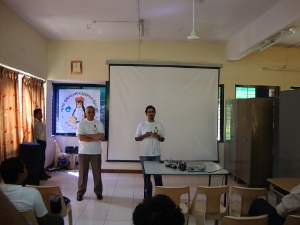
Dexter introducing PLUG @ dsi2009

Drupal Sprint India was a 2 day event held on 30 & 31st October 2009 in Pune and was one of the biggest Drupal Sprints ever held in India, Sprinters from Kashmir, Karnataka, Delhi, Gujrat and almost all regions of India took part in making this event a huge success, this event was divided in mainly 3 parts Sprints, Talks & Workshops, Sprint was sub classified as Code Sprint, Documentation Sprint & The Translation Sprint.

Day 1)

Sprint @ dsi2009The event started half hour delayed with a welcome message from PLUG, which continued with a talk by Aradhana Sharma on "Customizing your Drupal website using RULES", and while she was delivering her talk few of us were getting ready the Sprinters Hall, in a hour time the Sprints started with Adisson Berry heading the Document Sprint. With Sprinters coming in the Sprints were running houseful and talks went on well.

Abhishek Nagar @ dsi2009The first day talks included talks on


People were busy in listening to talks and beginners were busy with the workshop while Sprinters were# Customizing your Drupal website using RULES by Aradhana Sharma contributing the first Contribution came from Mr Prasad Shirgaonkar in the form of a Documentation for Localization which was highly appreciated, Sprinters worked on porting different Modules from Drupal 6 to Drupal 7.

The day came to an end for the Talks around 5:30 PM, but the sprints continued whole night, with sprinters working on various Modules. Documentation and Translations

Prasad Shirgaonkar @ dsi2009

Ankur Saxena @ dsi2009

Mir @ dsi2009

Gaurav @ dsi2009

Day 2)

Sprinters were on work for the whole night the first tweet for the ay 2 came around 3:00 AM :), Day 2 witnessed a drop in the audiance in talks but the Sprints continued housefull.

The second day talks included

  • Drupal 7, Anatomy of a killer release by Dipen Chaudhary
  • Do it with Drupal - The M3 Serve Platform by Gaurav Kumar
  • A Case Study of www.openthemagazine.com: How to make beautiful and featureful news and magazine websites in Drupal  by Sidharth Kshatriya
  • Building Indian Language based Social Networking Site with Drupal! by Prasad Shirgaonkar
  • Brightcove Integration with Drupal by Ravi Gupta
  • Workshop by Prasad Shirgaonkar on Quick & Easy Drupal Theme Creation!
  • The event schedule was reshuffled as one of the Speakers coming from a different location was unable to reach the venue due to some reasons.

The Sprinters were working hard with the sprints lot many bugs were fixed and reported, more than 500 Translations were done and uploaded to http://localize.drupal.org/languages/hi

Bhaskaracharya PratishtanFxing up the internetdsi Tshirt

Pre Event (Last minute arrangements)

Upgrading of the available bandwidth from 256Kbps to 8Mbs was a huge task and fortunately this was completed just one day before the event, Arrangement of event T-shirts just finished in time, setting up of Wifi at the Venue was the final task for 29th October 2009

For more images visit http://www.flickr.com/photos/tags/dsi2009/

Restrict Multiple Logins in Domain (AD)

By abhishek

I have always asked this question to my colleagues as to "How do i restrict Multiple Logins in an Active Directory Setup"

So here is the answer

Create a file when a user login and check for such file each time the login request is received  if file exists logoff, if file is not present Login and create the file. Its that simple

Below is the step by step process to achieve this using Group Policy

Assumptions:

  1. Windows 2003 AD is being used
  2. //<server>/logon is shared and write access is given to everyone

The Steps

Step 1) Create 2 batch files in C:\WINDOWS\SYSVOL\sysvol\domain.name\scripts\logon

File 1: login.bat

:: BEGIN CALLOUT A
If Exist \\server\logons\%username%.txt Goto notlogon
Echo %username% logged in from %computername% > \\server\logons\%username%.txt
Echo %username% logged in from %computername% > \\server\logons\%computername%.txt
:: END CALLOUT A
Goto end
:notlogon
Logoff
:end

File 2: logout.bat

:: BEGIN CALLOUT A
If Not Exist \\server\logons\%computername%.txt goto notlogon
Del \\server\logons\%username%.txt
Del \\server\logons\%computername%.txt
:: END CALLOUT A
Goto end
:notlogon
Logoff
:end

Step 2) Modify Group Policy

Edit the Group Policy related to the OU where you want to disable multiple logins, In Group Policy Object Editor locate to

User Configuration > Windows Settings > Scripts (Logon/Logoff)

Add the login.bat created earlier in Logon and logout.bat in Logoff

Adding Login Script on Group Policy

thats it now when you login a file would be created in //<server>/logon with the username and computername of the loggedin user and he/she will not be able to login to other computer and once he logoff these would be automatically deleted and the user will be allowed to login on any Client.

This was simple

Random Link for Wordpress Blogs

By abhishek

I recently started my Photo Blog, after various considerations i choosed Wordpress for it, currently i have more than 20 photos posted on it which is not actually a big number but i found that the older images or posts will never be seen to the readers as they don't appear on the frontpage for more than 4-5 days, which created a requirement of creating a Random Link on frontpage to show a Random post to the user if he wants to and this began search for a module or a plugin as its said in wordpress.

But No Luck i found various plugins but i needed something very very simple so i thought going by the code which lead me using the following code in my header.php to create a Random Post link

<?php
$randomPost = $wpdb->get_var("SELECT guid FROM $wpdb->posts WHERE post_type = 'post' AND post_status = 'publish' ORDER BY rand() LIMIT 1");

echo '<a href="'.$randomPost.'">>>Random Image<<</a>';
?>

The above code is quite simple and does exactly what is needed to generate a random post link for your wordpress blog.

Dreamhost Review

By abhishek

Well its been 10 months since i am using dreamhost its quite early to write up a review but still i would like to share , thanks to Amit Singh, Aman Jain and  Rohit Srivastav for recommending me dreamhost, the experience so far have been satisfactory i cannot say that there was no downtime, actually i have seen a lot of them :) still i am happy with it.

There have been instances when my hosting was altogether shifted by the support team to a different server to resolve issues, the support is excellent, the hosting plan in itself is good at least for shared hosters you get everything unlimited i.e. u can host unlimited website i currently host a dozen of them, and yes the One Click Installs are amazing, The affiliate programme is amazing i paid for first year of hosting and already i have earned much to pay for my next few years of hosting with them

I am using shared hosting since 10 years now tried different hosting providers but liked dreamhost so if you are planning to get a shared hosting i would recommend you Dreamhost, and yes you also get a domain free when registering for Hosting Plans.

I recommend the L1 Yearly plan of dreamhost if you are really interested use this link to register and get a $50 discount :)

Why should one go with Dreamhost ?

Suggestion

If you are hosting multiple sites don't host them with a single account. create different accounts for each site after all u have unlimited accounts in ur plan.

I would also like to share some of the emails from support


These guys moved me to a new server

Hello,

On Wed, 30 Sep 2009, you wrote:

> > Hi Team,
> >
> > Thankx for moving me to a new server tough i would like to know why i
> > was moved, was i consuming lot of resources if yes do let me know so
> > that i can optimize a bit

    Nope, that wasn't it. We're just doing a bit of upgrading and
restructuring on our end. You can read all about it here:

http://wiki.dreamhost.com/Server_Moves#Why_do_servers_change.3F

If there's anything else we can do for you, please let us know.

Thanks!
Dan W

Why did u try to restore when i never wanted it

> What do you mean by you are unable to restore my website i never requested
> > to do so.

Sorry about that. Another representative was working on this for you and
mistakenly tried to restore your website. You may disregard this.

Write back if I can do anything else for you.

Thanks!
Mike S

Funny

so far the experience is good

I recommend Dreamhost for your hosting

What to expect from Drupal Sprint India 2009

By abhishek

A formal announcement for Drupal Sprint India 2009 was already done last month and is available here!!

I am very sure that now you would be very curious to know what is it all about so this post might clear some of your confusion.

Whats in Drupal Sprint India 2009

Hey, this event is for YOUUUUUUUUU !!!

Why should i attend ??

a) If you are a newbie

  • You will get a chance to learn something very dynamic.
  • You will get a chance to know Drupal which is one of the best opensource Content Management System ever created.
  • You will get an opportunity to build up network with Drupal Geeks from India and abroad.
  • You will get an opportunity to be contribute to Drupal in various forms.

b) If you are a Drupaler

  • You can showcase your skills via talks/workshops.
  • You can help in Bug Fixing
  • You can help in Documenting Drupal
  • You can help in Localizing Drupal
  • You will meet Drupal enthusiasts from all over India and across

 IFFFFFFFFFF you are unable to make it to pune this time.

so what are you waiting for register under various categories in Drupal Sprint India by visiting http://drupalindia2009.plug.org.in/