How to Masquerade (ICS) in Linux

By abhishek

Its very simple to masquerade in linux with few lines of iptables and ip_forward commands.

Assumptions : Your Linux box has 2 NIC's one connected to internet (eth0) other connected to local network (eth1 IP 192.168.0.10)

first of all you have to flush and delete existing firewall rules which are there by default in linux .

so flush rules by typing the following in terminal

iptables -F
iptables -t nat -F
iptables -t mangle -F

now delete the chains by using

iptables -X
iptables -t nat -X
iptables -t mangle -X

now its time to save iptables so type

service iptables save
service iptables restart

now all rules and chains will clear !

check it by /etc/sysconfig/iptables which has all defaults rules set to accept.

now open /etc/rc.d/rc.local

and insert the following line

echo ” 1 “> /proc/sys/net/ipv4/ip_forward

and then save and close.

now asuming that your internet interface is eth0 then type :

iptables -t nat -A POSTROUTING -o eth0 -j MASQUERADE
service iptables save
service iptables restart

note:- check your service of iptables is set to start during boot up .

or check status of your iptables service

chkconfig -–list iptables

if level 5 is on then its ok othewise start service at level 5 or level 2345.

Now Set the Default Gateway of eth1 as eth0's IP Address

and then set Default Gateways of all other client to Server's eth1's IP address (192.168.0.10) enjoy :)

Adding CAPTCHA to Drupal Guestbook Module

By abhishek

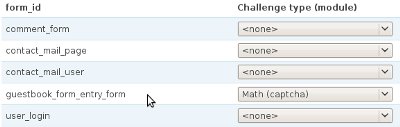
Guest book is one of the essential part for any website, To add a guestbook on your drupal site you can use the guestbook module, the problem you would face is adding a captcha to this now captcha is also very essential to control spam now how to add captcha its very simple just execute the following query


INSERT INTO `captcha_points` ( `form_id` , `module` , `type` ) 
VALUES
( 'guestbook_form_entry_form', NULL , NULL );

and you are done now go to /admin/user/captcha on your site and enable captcha on guestbook this would look something like this

गामाभाना

By abhishek

Need for phonetic editing has its roots in different keyboard layouts developed and used by different users and multiple fonts which in combination failed to produce unique easy to use compatible typing/editing solution. The problem is more in the area of software solutions being developed for different Indic Languages. Web based Direct editing or phonetic editing is an implementation which allows user to type in the context using phonetic key patterns across different keyboards, browsers and different Indic scripts.

What is gamabhana?

gamabhana is an open source implementation that uses purely client side java script to enable phonetics in editable html tags such as div (not editable in mozilla firefox) , iframe, input, textarea, document so that you can type in the context phonetically in the selected Indic script with transliteration capabilities that support unicode fonts with the help of  pre-designed gamabhana maps.

With gamabhana library and gamabhana phonetic maps you can:

  • Attach phonetics to editable html tags such as iframe and/or input (single line) and/or textarea and/or document.
  • Design your own transliteration maps for any language/script.
  • Achieve Unicode support across browsers, applications, platforms.
  • Type in the context phonetically ( direct input method) in IE ( V 5 above) and Firefox Mozilla.

गामाभाना is now available @ drupal.org

Project Page http://drupal.org/project/gamabhana_drupal