
User / Group Disk Quotas A three Step Guide

A disk quota is a limit set by a system administrator that restricts certain aspects of file system usage on modern operating systems. "Wikipedia"

Requirements : Quota Package

Where to get it : Quota package is generally available in majority of Linux Distros but still if your distro doesn't provide you with Quota compile it from http://sourceforge.net/projects/linuxquota/ :)

Step 1) Installation :

a) openSUSE : yast -i quota

b) Ubuntu : sudo apt-get install quota

c) Fedora : yum install quota

d) Others : Use rpm or compile if not available


Step 2) Enable Disk Quota

Disk quota is generally applied on a user or a set of users to its recommended to enable Disk Quota on your Home partition dont enable quota on the root partition unless you are under the expert category

SMTP Authentication Support for your Drupal Sites

Drupal uses the php mail() function to send emails by default.
 
Here is a module which adds SMTP functionality to Drupal. More specifically, the ability for your site to send mail using an SMTP server that requires authentication.
 
Link to Module http://drupal.org/project/smtp
This module is currently in Beta stage for Drupal 6.x, i just tried it works fine and you can use this too. remember to read INSTALL.txt before installing this module as there are certain dependencies which are needed to have this module working.
 
This module uses the smtp and mail class’s from PHPMailer. http://phpmailer.sourceforge.net

How to Masquerade (ICS) in Linux

Its very simple to masquerade in linux with few lines of iptables and ip_forward commands.

Assumptions : Your Linux box has 2 NIC's one connected to internet (eth0) other connected to local network (eth1 IP 192.168.0.10)

first of all you have to flush and delete existing firewall rules which are there by default in linux .

so flush rules by typing the following in terminal

iptables -F
iptables -t nat -F
iptables -t mangle -F

now delete the chains by using

iptables -X
iptables -t nat -X
iptables -t mangle -X

now its time to save iptables so type

service iptables save
service iptables restart

now all rules and chains will clear !

check it by /etc/sysconfig/iptables which has all defaults rules set to accept.

now open /etc/rc.d/rc.local

and insert the following line

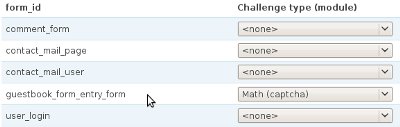
Adding CAPTCHA to Drupal Guestbook Module

Guest book is one of the essential part for any website, To add a guestbook on your drupal site you can use the guestbook module, the problem you would face is adding a captcha to this now captcha is also very essential to control spam now how to add captcha its very simple just execute the following query


INSERT INTO `captcha_points` ( `form_id` , `module` , `type` ) 
VALUES
( 'guestbook_form_entry_form', NULL , NULL );

and you are done now go to /admin/user/captcha on your site and enable captcha on guestbook this would look something like this